
This product is available for local installation in your IT environment or your chosen PaaS solution.
Unified Active Directory, Exchange and Office Microsoft 365 management and reporting
Get more done in AD through automation
By automating repetitive, tedious and complex tasks in your day-to-day Active Directory management, you can save time and streamline the way you work. You can also orchestrate a series of tasks in AD and external applications. More about orchestration

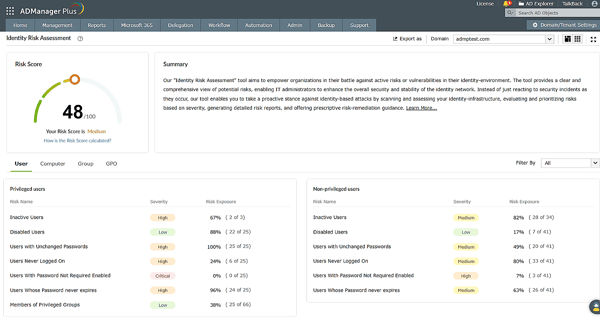
Identity risk assessment and access certification
The identity risk assessment feature improves cybersecurity readiness by anticipating risks and providing measures to address those risks.
Access certification ensures that users only have the permissions they need to do their job and helps organizations implement the least privilege principle and demonstrate compliance.
Read more here
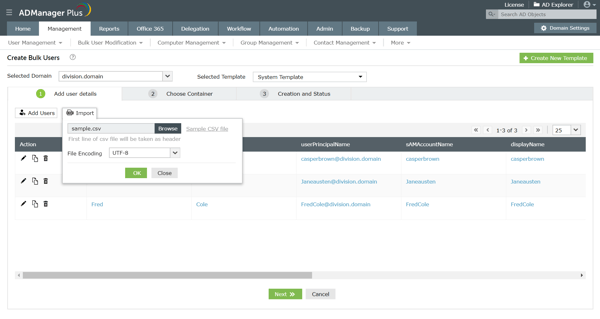
Smooth bulk management makes you more efficient
Simplifies bulk creation, management and deletion of Active Directory objects. Manage one or more user accounts at once. When you add new users in ADManager Plus, you can choose to create mailboxes in Exchange and accounts in Office 365 and G Suite at the same time as you create the user account in Active Directory. To make things even easier, you can create different templates for different types of users.
A few selected functions
Help desk delegation
Let the help desk or, for example, finance staff make changes in Active Directory in a secure and restricted way
Microsoft 365 reporting
In addition to managing users in Microsoft 365 with ADManager Plus, you can also generate user, license and group reports. You can also get information about the organization's shared mailboxes.
Active Directory cleanup
The solution helps you find inactive, disabled and expired users and computers in Active Directory. Once you have found them, your policy determines what to do with them.
Microsoft 365 and Exchange management
Manage users and groups individually or in bulk in Microsoft 365, manage licenses, create and migrate Exchange mailboxes, set storage limits, add proxy addresses and more.
Group and computer management
The tool lets you easily create and modify multiple groups and computers in Active Directory at the same time.
Active Directory automation
ADManager Plus automates without you losing control – tailor the automation and use an approval workflow. Automate 14 key tasks in Active Directory and choose from 100 predefined events.
360º user provisioning
Create users simultaneously in AD, Exchange, Microsoft 365, Skype for Business and Google Workspace.
Onboarding and offboarding orchestration
Create and delete users in AD and external applications using webhooks and orchestration templates. More about orchestration
Custom workflows for specific needs
Build different workflows for different processes to meet your organization's needs.
Download and try for 30 days
Download a fully functional version of the product and try it for 30 days. Support is included during the evaluation period.
Product walkthrough
of ADManager Plus
In this video you get a walkthrough of the most important features in ADManager Plus.
More functions
Compliance reports
Active Directory reports to help you comply with regulations such as GDPR, SOX, HIPAA, GLBA, PCI and much more.
Active Directory reporting
To give you control over your Active Directory, the solution includes over 150 ready-made reports, and you can also create your own reports without any scripting knowledge.
Last logon reporting
The last logon report is generated by querying all Domain Controllers in a given domain for the last logon and then picking out the most recent time.
Explore ADManager Plus
