On-premises
On Premises
This product is available for local installation in your IT environment or your chosen PaaS solution.

Low-code platform for building business applications

AppCreator is a low-code application development platform that lets developers quickly build powerful custom applications and deploy them in their own environment (on-premises).

How AppCreator helps
IT teams

With its feature-rich low-code tools, AppCreator helps simplify things for app developers: it requires fewer resources to work on projects and takes a tenth of the time. IT teams can collaborate, develop, deploy and maintain applications (for desktop and mobile) and workflows while meeting data residency, security and compliance needs.

ManageEngine AppCreator - How AppCreator helps IT teams

Let the business build business applications

Another strategy is to encourage staff in the organization, including employees with little or no app development expertise, to create
business applications using low-code and no-code tools. IT teams can focus on business-critical projects while other staff create lighter business solutions. This also helps improve technology adoption in the organization, increasing synergy between the business and IT.
ManageEngine AppCreator - Let the business build business applications

Run your applications in your own IT environment

An on-premises installation gives your organization full control over your applications. Your servers and data are protected by your security measures, and you decide when to upgrade, schedule maintenance and perform other administrative tasks.

  • Comply with data privacy regulations
  • Get flexibility with multiple deployment options
  • Protect critical data with secure solutions
  • Take ownership of your applications

ManageEngine AppCreator - Run your applications in your own IT environment.

Selected functions

Form builder

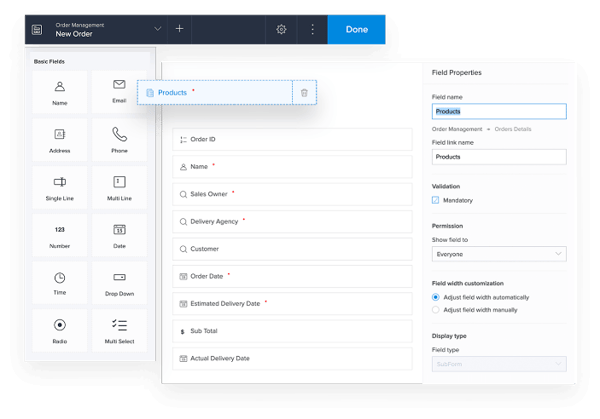
Drag and drop over 30 types of form fields to collect data such as names, email addresses and customer feedback.

Analytics and dashboards

Create interactive reports and dashboards with AppCreator's drag-and-drop interface. Converge data from multiple sources and add any number of charts and widgets to make your data easy to understand.

Workflows

Use the workflow builder to automate tasks in your applications. These tasks can range from sending emails and SMS to triggering app-related functions such as hiding or disabling fields based on predefined criteria.

Advanced workflows

ManageEngine's scripting language Deluge lets you create workflows without needing extensive code.

Reminders and notifications

Schedule tasks to send reports and event invitations on time. Remind employees when tasks are approaching. Keep track of your work with notifications about progress or process deviations.

Data visualization

View your data as lists, calendars, summaries, grids, spreadsheets and more. Sort your data and retrieve the information you need. Monitor your results with custom dashboards.

Multi-platform builder

Design applications for desktop, mobile and tablet at the same time. Access the applications via a web browser or as web apps on your mobile devices.

Mobile apps

Customize your applications with an icon of your choice and then publish them in online app stores.

Mobile SDK

Use AppCreator's mobile SDK and UI kit to build your own iOS and Android apps for your business platform.

Download and try for 30 days

Download a fully functional version of the product and try it for 30 days. Support is included during the evaluation period.

Fill in your details to get started.

Security and other functions

Share applications

Share your entire application or parts of it via a public link or a private email to users in your organization.

Role-based access

Give access only to the forms and reports that are relevant to each user.

Change log

Use audit logs to see who changed records and when it happened.

Online portal

Use portals to simplify how your customers and business partners interact with your company's applications and data.

Sandbox

When you want to test modifications to your app, our secure sandbox ensures your live app is not affected.

Data migration

Import Excel data or convert it from Google Sheets. If you use Microsoft Access or FileMaker databases, run them through our migration tools.

Book a demo

Fill in the form to book a web demo with one of our specialists.