
This product is available for local installation in your IT environment or your chosen PaaS solution.
IP address and switch port management
IP address & switch port management
OpUtils complements existing tools by providing real-time troubleshooting and monitoring. It helps network administrators easily manage their switches and IP addresses with a set of more than 20 network monitoring tools. You can detect intrusions via devices, keep track of bandwidth usage, monitor the availability of critical devices, back up Cisco configuration files and more.
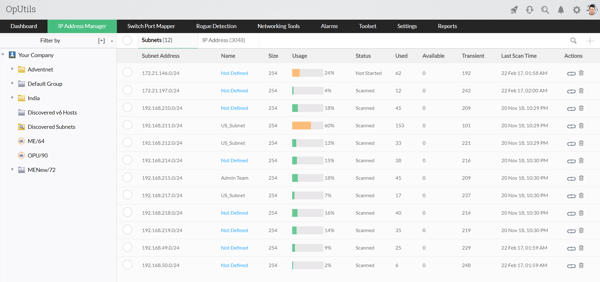
Functions
IP address management
Enable advanced IP scanning of IPv4 and IPv6 subnets in your network to identify available and used IP addresses.
Switch port management
Scan all switches in your network, map switch ports, run port scans and view details such as physical location, users and more.
Rogue device detection
Identify intrusions by rogue devices and block access for these devices.
Bandwidth monitoring
Keep track of your network's bandwidth usage and generate bandwidth usage reports for various parameters.
Config file management
Schedule backups of Cisco configuration files for upload or download and compare different versions of files.
SNMP tools
View a snapshot of MIBs and query SNMP devices to create a map of SNMP IP nodes in the network.
Cisco tools
Scans the subnet to get information about Cisco devices and collects details such as snapshots, IOS details and flash memory details.
Diagnostics
Checks the availability and health of a system. Scan a range of IP addresses and see the status of a node.
Network monitoring
Scans TCP ports and SNMP-enabled devices and retrieves IP address information, system information and more.
Download and try for 30 days
Download a fully functional version of the product and try it for 30 days. Support is included during the evaluation period.
Fill in your details to get started.
More functions
Wake-on-LAN
Both manual and scheduled startup of inactive machines on a network.
Address monitoring
Troubleshoot, manage and inspect your IP addresses, MAC addresses and DNS names with address monitoring tools.
Network tools
Monitor the critical servers in the network for availability and get alerted to network issues that require immediate attention.
Explore OpUtils
